How passkeys work (without the cryptography degree)
I’ve been asked several times recently how passkeys actually work.
The short version is:
A password proves that you know a secret.
A passkey proves that you possess a cryptographic key.
That difference makes passkeys resistant to phishing, password reuse, and many common data breaches. Here’s what happens behind the scenes.
What is a passkey?
A passkey is a digital credential based on public-key cryptography — the same general technology used to secure internet traffic and software updates.
When you create a passkey for a website or app, your device generates two mathematically connected keys:
- A public key, which is sent to the website and is safe to share.
- A private key, which remains protected by your device or credential provider.
These two keys work together, but the private key cannot realistically be calculated from the public one.
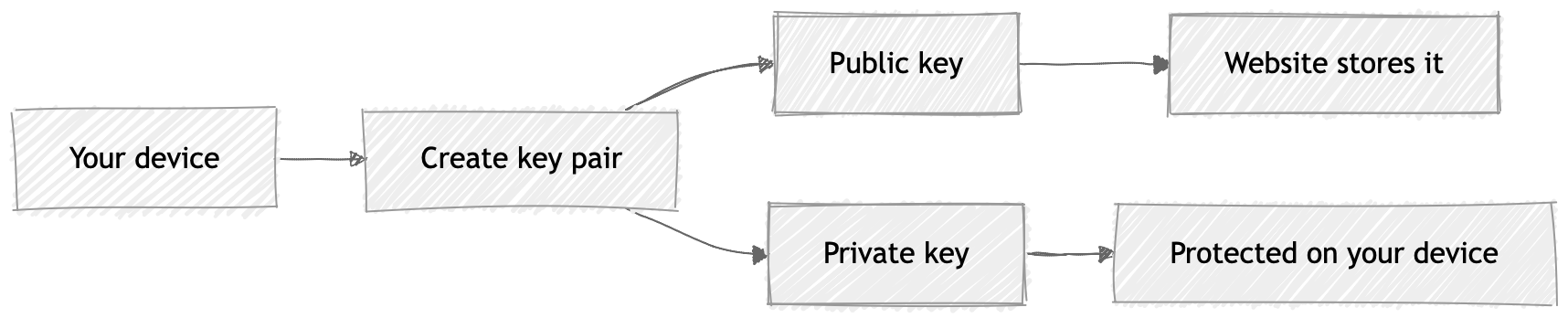
Unlike a password, there is no shared secret stored by both you and the website.
What happens when you sign in?
When you return to the website, it sends your device a unique, one-time challenge.
Your device asks you to confirm your identity using Face ID, Touch ID, Windows Hello, a PIN, or another local verification method. Once approved, the private key signs the challenge.
The website checks that signature using the public key it already has. If the signature is valid, you’re signed in.
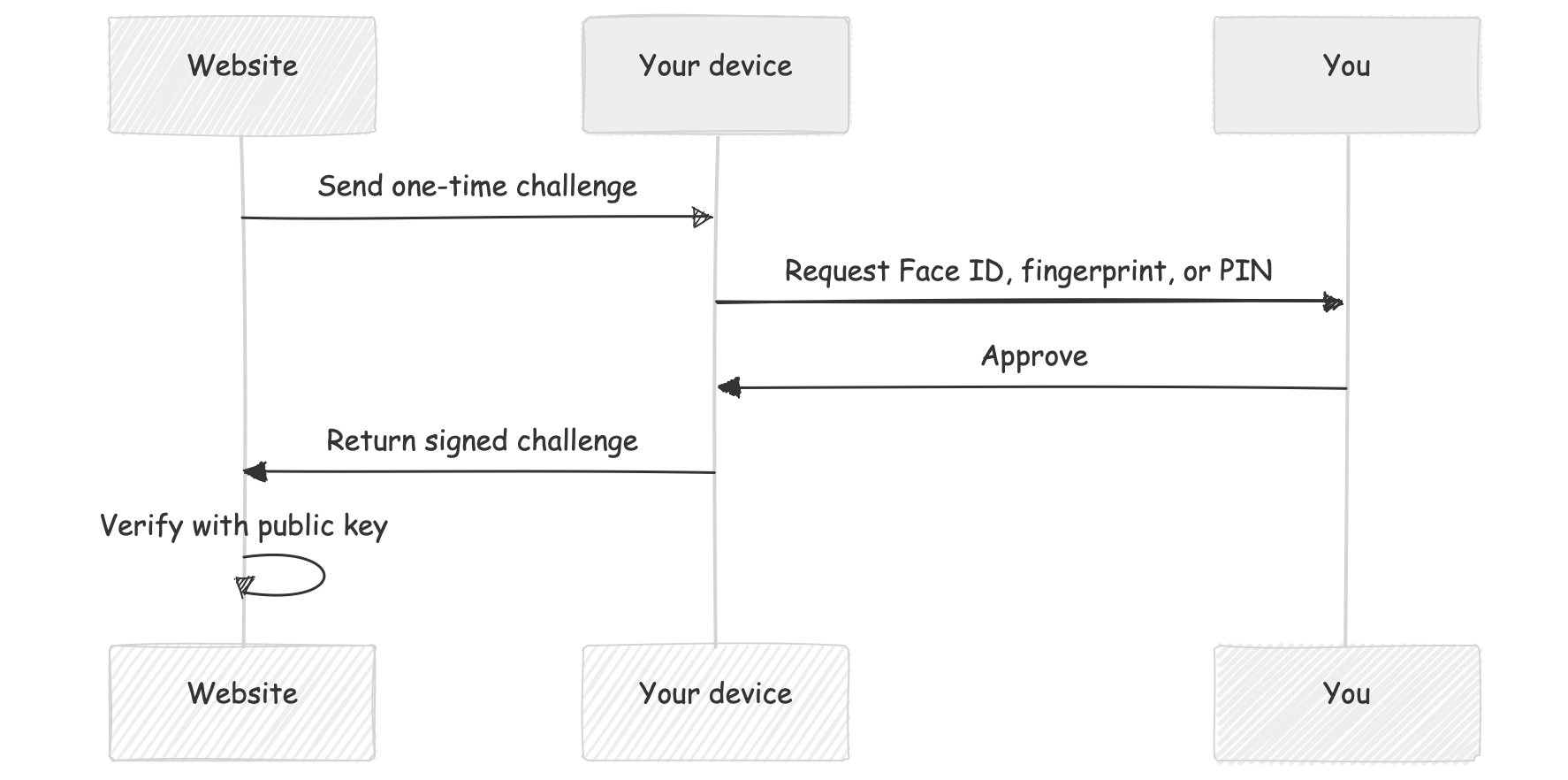
Your biometric data is not sent to the website. Face ID or your fingerprint simply unlocks the passkey locally on your device.
Passkeys vs. passwords
A password says:
“I know a secret that I can type.”
A passkey says:
“I control the private key associated with this account.”
This distinction matters because anything you can type can also be copied, shared, phished, or accidentally entered into the wrong website. A passkey is designed to work only with the legitimate website or app for which it was created.
If an attacker creates a convincing copy of GitHub at g1thub.com, your GitHub passkey will not authenticate there. The credential is tied to the real service’s domain, which makes passkeys strongly resistant to phishing.
What if the website is hacked?
With traditional passwords, a compromised database may expose password hashes. Attackers can sometimes crack weak passwords or use leaked credentials against other services.
With passkeys, the website stores only public keys. If attackers steal them, they still cannot use those keys to sign in. Authentication requires the corresponding private keys, which remain under the user’s control.
That does not make the website itself impossible to compromise, but it removes one of the most valuable targets: a database full of reusable login secrets.
Are passkeys locked to one device?
Sometimes, but not always. A passkey can be:
- Device-bound, such as one stored on a hardware security key.
- Synced, using a credential provider such as 1Password, Apple Passwords or another compatible password manager.
Synced passkeys can become available across your trusted devices. For example, a passkey created on an iPhone may also be available on a Mac signed into the same Apple Account.
You can also sometimes use a nearby phone to sign in on another computer. The computer displays a QR code, and your phone confirms the login through a secure cross-device process.
The exact experience depends on the website, operating system, browser, and passkey provider.
What happens if I lose my device?
This is an important question — and one that websites should address before encouraging users to abandon every other login method.
Possible recovery options include:
- Accessing a synced passkey from another trusted device.
- Using a second passkey stored on another device or hardware security key.
- Following the website’s account-recovery process.
- Using a recovery code or another previously configured authentication method.
For important accounts, it is sensible to register more than one passkey or confirm that your passkeys are securely synchronized and recoverable. A passkey is only as useful as your ability to regain access to it.
Are passkeys better than password managers?
Passkeys and password managers are not really competitors. In fact, many password managers can now store and synchronize passkeys.
A password manager already solves several major problems by generating unique passwords, remembering them, and filling them only on matching websites. For someone using a good password manager correctly, moving to passkeys may feel like an incremental improvement rather than a revolution.
Passkeys still offer meaningful advantages:
- There is no password to guess or reuse.
- There is no shared secret for the website to leak.
- Credentials are tied to the correct website, reducing phishing risk.
- Signing in can be faster and require fewer steps.
The trade-off is that access depends on your devices, credential provider, or recovery setup. The ecosystem is also still evolving, so the experience is not equally smooth everywhere.
Should you use passkeys?
For most people, passkeys are a strong option — especially for important accounts that support them well.
They do not eliminate every security risk, and they do not make account recovery magically disappear. What they do is replace a fragile, reusable secret with a cryptographic proof that is much harder to steal or phish.
A practical approach is:
- Use passkeys where they are supported.
- Keep them synchronized through a trusted provider.
- Add a second passkey or hardware security key for critical accounts.
- Store recovery codes somewhere safe.
- Continue using a password manager for services that still require passwords.
And whatever you do, please don’t put your passwords on a sticky note attached to your monitor 🫣